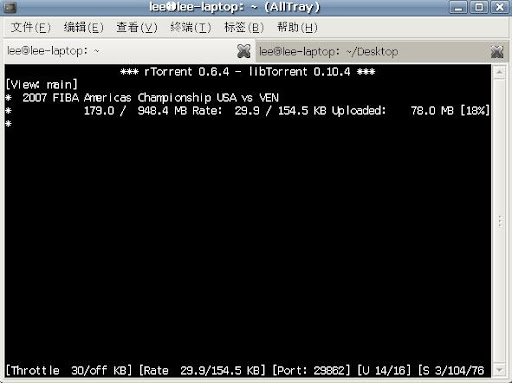
rTorrent 作为一款基于控制台的 BT 下载客户端程序,具有高性能、低资源的明显优势。它不仅功能较为全面,而且还支持会话管理及迅速恢复等特性。它是用C++语言编写的用于*nix下的软件。由于上一次用了基于命令行下的Email软件Mutt(具体看这里),所以我爱上了命令行下的软件,它们不仅十分小巧,而且功能上并不弱于其它GUI的软件。rTorrent正是这样一款软件,所以这次就介绍一下它吧。
要使用rTorrent很简单,先去它的官网下载吧,它几乎有各种Linux发行版的包,所以使用非常方便,你就根据自己的需求去下载相应的包然后安装。安装后先要自己配置,这是命令行软件共同的特点,配置文件为.rtorrent.rc,下面是我的配置文件,也是从别人的配置文件改过来的,根据自己情况改一下吧,里边注释很清楚:
# This is an example resource file for rTorrent. Copy to
# ~/.rtorrent.rc and enable/modify the options as needed. Remember to
# uncomment the options you wish to enable.# Maximum and minimum number of peers to connect to per torrent.
#min_peers = 40
#max_peers = 100# Same as above but for seeding completed torrents (-1 = same as downloading)
#min_peers_seed = 10
#max_peers_seed = 50# Maximum number of simultanious uploads per torrent.
#max_uploads = 15# Global upload and download rate in KiB. "0" for unlimited.
#download_rate = 0
#upload_rate = 0# Default directory to save the downloaded torrents.
directory =/amusement/bt# Default session directory. Make sure you don't run multiple instance
# of rtorrent using the same session directory. Perhaps using a
# relative path?
session = /amusement/bt/session# Watch a directory for new torrents, and stop those that have been
# deleted.
schedule = watch_directory,5,5,load_start=/amusement/bt/watch/*.torrent
schedule = untied_directory,5,5,stop_untied=# Close torrents when diskspace is low.
#schedule = low_diskspace,5,60,close_low_diskspace=100M# Stop torrents when reaching upload ratio in percent,
# when also reaching total upload in bytes, or when
# reaching final upload ratio in percent.
# example: stop at ratio 2.0 with at least 200 MB uploaded, or else ratio 20.0
#schedule = ratio,60,60,stop_on_ratio=200,200M,2000# The ip address reported to the tracker.
#ip = 127.0.0.1
#ip = rakshasa.no# The ip address the listening socket and outgoing connections is
# bound to.
#bind = 127.0.0.1
#bind = rakshasa.no# Port range to use for listening.
port_range = 29862-29862# Start opening ports at a random position within the port range.
#port_random = no# Check hash for finished torrents. Might be usefull until the bug is
# fixed that causes lack of diskspace not to be properly reported.
#check_hash = no# Set whetever the client should try to connect to UDP trackers.
#use_udp_trackers = yes# Alternative calls to bind and ip that should handle dynamic ip's.
#schedule = ip_tick,0,1800,ip=rakshasa
#schedule = bind_tick,0,1800,bind=rakshasa# Encryption options, set to none (default) or any combination of the following:
# allow_incoming, try_outgoing, require, require_RC4, enable_retry, prefer_plaintext
#
# The example value allows incoming encrypted connections, starts unencrypted
# outgoing connections but retries with encryption if they fail, preferring
# plaintext to RC4 encryption after the encrypted handshake
#
# encryption = allow_incoming,enable_retry,prefer_plaintext#
# Do not modify the following parameters unless you know what you're doing.
## Hash read-ahead controls how many MB to request the kernel to read
# ahead. If the value is too low the disk may not be fully utilized,
# while if too high the kernel might not be able to keep the read
# pages in memory thus end up trashing.
#hash_read_ahead = 10# Interval between attempts to check the hash, in milliseconds.
#hash_interval = 100# Number of attempts to check the hash while using the mincore status,
# before forcing. Overworked systems might need lower values to get a
# decent hash checking rate.
#hash_max_tries = 10# Max number of files to keep open simultaniously.
#max_open_files = 128# Number of sockets to simultaneously keep open.
#max_open_sockets = <no default># Example of scheduling commands: Switch between two ip's every 5
# seconds.
#schedule = "ip_tick1,5,10,ip=torretta"
#schedule = "ip_tick2,10,10,ip=lampedusa"# Remove a scheduled event.
#schedule_remove = "ip_tick1"
encoding_list=UTF-8
其中有几个地方要注意:"session = /amusement/bt/session",这里放的是下载的session,主要作用是如果你下载到一半停了,要下次再继续的话,这个目录一定要设;"schedule = watch_directory,5,5,load_start=/amusement/bt/watch/*.torrent",这里设定对种子的监视,只要你把种子放到这个文件夹下,那么rTorrent会自动开始下载或上传;"port_range = 29862-29862 ",这里是设置端口映射的,主要是对内网用户有用,提高下载速度。


 博文
博文


没有评论:
发表评论